
ESPN hosts more bracket pools than any other platform. If you're in an office pool, a family pool, or a friends pool, there's a good chance it lives on ESPN.
But ESPN only shows you the current standings. Points and rank. That's it.
BracketSim imports your entire ESPN pool - every person's bracket, every pick - and runs thousands of simulations to show you who actually has the best chance of winning.
Here's how to get set up.
Step 1: Find Your ESPN Pool URL
Open ESPN's Tournament Challenge and navigate to your group's page. The URL in your browser bar will look something like this:
https://fantasy.espn.com/games/tournament-challenge-bracket-2026/group?id=XXXXXXX
Copy that URL. That's all you need.
You can also find your Group ID on the ESPN pool page - it's the number after id= in the URL.
Step 2: Create a BracketSim Account
Head to mybracketsim.com and sign up. It's free. You can create an account with your email or sign in with Google.
Step 3: Paste Your Pool Info and Import
Once you're logged in, click "Import Pool" and select ESPN as your platform. Paste your pool URL or Group ID into the field and hit Import.
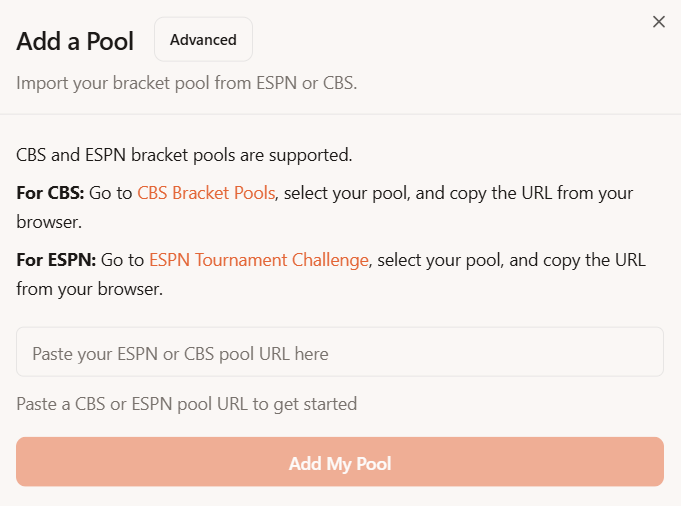
MyBracketSim will pull in every bracket from your ESPN pool. This usually takes a few seconds depending on pool size.
Step 4: See Your Pool Standings With Everyone's Picks
After the import finishes, you'll see your full pool loaded into BracketSim. Every player, every pick, all in one place.
You can browse through individual brackets, see who picked what, and check the current point standings - which will match what ESPN shows you.
But the real value is in the next step.
Step 5: Run a Simulation
Click "Run Simulation" to kick off a Monte Carlo analysis of your pool. BracketSim will simulate the remaining tournament games thousands of times, score every bracket in each simulation, and calculate each player's probability of winning the pool.
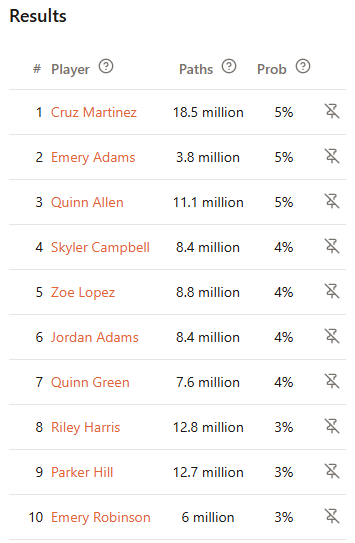
Now you're looking at the numbers that actually matter. Not just who's ahead right now, but who's most likely to win when the tournament is over.
Frequently Asked Questions
What data does BracketSim access? BracketSim reads the publicly available bracket picks and scoring information from your ESPN pool. It does not access your ESPN account, password, or any personal information.
How often does it update? Your pool refreshes with the latest game results when you load it. As games finish and brackets update on ESPN, you can re-import to get the latest data.
Is it free? Importing your pool and seeing the standings is free. Running full simulations and accessing rooting interest analysis requires BracketSim Pro ($5 for the full tournament).
How many people can be in my pool? BracketSim handles pools of all sizes up to 500. Whether you've got 10 people or 500, the import and simulation process works the same way.
What if my pool uses custom scoring? BracketSim supports standard ESPN scoring. If your pool has a custom scoring configuration, BracketSim will detect and apply it automatically.
Get Started
The whole process takes about 60 seconds. By the time the next game tips off, you'll know your real odds.
Import your ESPN pool now at mybracketsim.com
In short: Importing your ESPN pool into BracketSim takes one URL and about a minute. Once it's in, you get simulation-based win probabilities that ESPN doesn't offer. Free to import, $5 to unlock full analysis.