
If your bracket pool lives on CBS Sports, you've been stuck with the same basic leaderboard everyone else gets. Points, rank, and not much else.
BracketSim changes that. Import your CBS Sports pool and get Monte Carlo simulation results that show each player's actual probability of winning - not just their current point total.
Here's how to do it.
Step 1: Find Your CBS Sports Pool
Log into CBS Sports and navigate to your bracket pool. You'll need your pool's URL or pool name. The URL will look something like:
https://www.cbssports.com/fantasy/college-basketball/ncaa-tournament/brackets/pools/live/POOL_NAME
Step 2: Create a MyBracketSim Account
Go to mybracketsim.com and create a free account. Email signup and Google sign-in are both available.
Step 3: Import Your CBS Pool
Click "Import Pool" and select CBS Sports as your platform. Enter your pool URL or pool name and click Import.
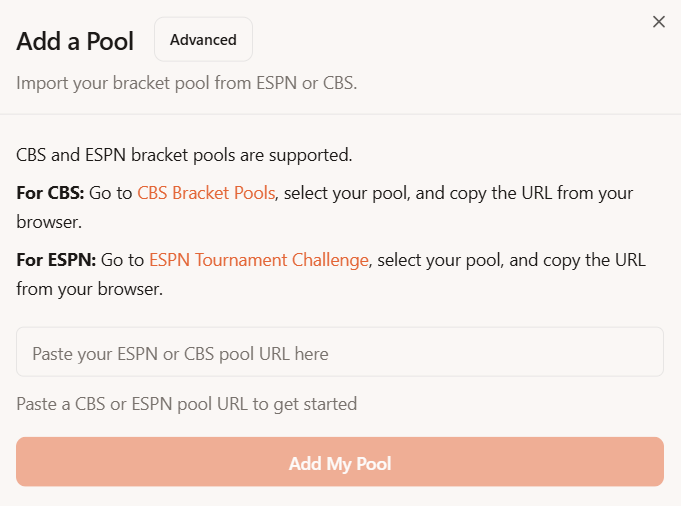
MyBracketSim will pull in all the brackets from your CBS pool. Import time depends on pool size but usually finishes within a few seconds.
Step 4: Review Your Pool
Your complete CBS Sports pool is now inside MyBracketSim. Every player's picks, current scores, and standings are all visible.
Browse through brackets individually or scan the full leaderboard. Everything matches what CBS shows - but now you have a lot more you can do with it.
Step 5: Run a Simulation
Hit "Run Simulation" and let MyBracketSim do the math. It runs thousands of Monte Carlo simulations of the remaining tournament games, scores every bracket each time, and calculates win probabilities for every player in your pool.
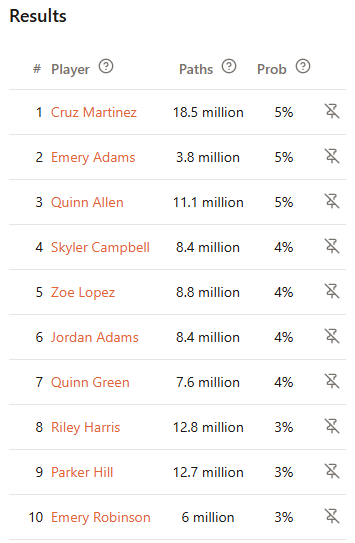
Now you can see who actually has the best shot at winning - and it's often not the person at the top of the leaderboard.
Frequently Asked Questions
What data does BracketSim need from CBS? BracketSim reads the bracket picks and scoring data that are visible within your CBS Sports pool. It does not access your CBS account credentials.
Does it support CBS's scoring system? Yes. BracketSim detects your pool's scoring configuration and applies it to simulations automatically.
How do I update my pool during the tournament? As games finish, you can re-import your pool to pull in updated results and re-run simulations with the latest data.
Is it free? Importing your pool and seeing standings is free. Full simulation results and rooting interest analysis require BracketSim Pro ($5 for the tournament).
I have pools on both ESPN and CBS. Can I import both? Yes. You can import multiple pools from different platforms into the same BracketSim account.
Get Started
It takes about a minute from start to finish. Import your CBS pool, run a simulation, and know your real odds before the next tip-off.
Import your CBS Sports pool at mybracketsim.com
In short: BracketSim supports CBS Sports pools alongside ESPN. Import takes a minute, gives you simulation-based win probabilities CBS doesn't offer. Free to import, $5 for full analysis.